


|
|
|
|
|
|
|
| |
| 17-SEP-2006 | blk |
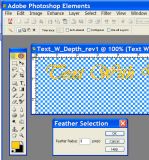
Select the layer containing your text. Next using the “magic wand” tool select your text. You should now see the “marching ants” surrounding every letter in you text layer. Now here is where the magic starts. From the SELECT menu pick FEATHER. The feather selection dialog box will appear. I have experimented with different values and found for web viewing a feather radius of 1 pixel gives the best results. Feathering applies to the selected area, and in this case is how the shading will be applied outward from the boundary of the selected area; in this case your text.
©2011 by P. Guttenberg - all rights reserved. Please do not reproduce, alter, or use without prior permission.