photo sharing and upload picture albums photo forums search pictures popular photos photography help login
Digital Nuts | all galleries >> Galleries >> Tutorials and How To's > edit image
previous | next
Hawk

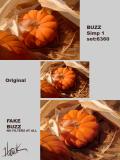
Simulated Buzz by Hawk

Photoshop CS
Top pic: Buzz Simplifier 1 setting:6360 - no other adjustments
Center pic: original unmodified
Bottom pic: a laundry list of manipulation
No builtin PS or 3rd party filters or plugins of any kind were used
1st layer - shadows and highlight adjust - allows lighten or darken shadows
2nd layer - desaturation to b/w then hand blur with the Finger tool - History brush back any mistakes.
3rd layer - shadows and highlight adjust - a second tuneup as in the 1st layer.
4th layer - color adjustment - saturation intensity.
All layers will have to be viewed turning the viewing Eye on and off for each layer.
*note: nothing is automatic - careful manual adjustment is required this method will be individual for each picture and will take experimentation.


other sizes: small medium original auto
share
Digital Nuts17-Apr-2009 17:37
Truly amazing !
almost identical to Buzz , this is true .
But I think your work looks much better !
It looks less mechanical , more artistic , much more subtle .
It looks hand-painted , in fact .
fmr.
Digital Nuts20-Oct-2004 13:18
Unbelieveable...your work is almost identical to Buzz!
Jeannie
Digital Nuts20-Oct-2004 12:00
Amazing, it looks almost identical.
Judy
Digital Nuts20-Oct-2004 05:45
Looks great, I'm not sure I know what you mean, first layer darks and lights? how do you do this? PSE.
Heather
Type your message and click Add Comment
It is best to login or register first but you may post as a guest.
Enter an optional name and contact email address. Name
Name Email
help private comment