photo sharing and upload picture albums photo forums search pictures popular photos photography help login
Type your message and click Add Comment
It is best to login or register first but you may post as a guest.
Enter an optional name and contact email address. Name
Name Email
help private comment
creativematrix | all galleries >> Small Tutorials >> Ditherbox Textures in Photoshop > Step 6
previous | next

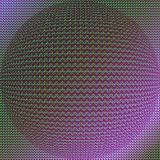
Step 6

To add interest I spherized the image. Copy all merged layers and then paste (to give you a composite) then choose Filter...Distort...Spherize 100%.


other sizes: small medium original auto
comment | share