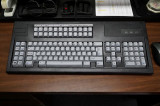
If you love the old IBM buckling spring clickety-clack keyboards from the past, some Unicomp product variant is for you. They have an elegant tactile feel that makes almost all other keyboards numb in comparison.
I've customized my keyboard experience so that I have the the old IBM keyboard touch and the shortcut/macro flexibility that I want for everyday usage.
*************************************
That 'cheat sheet' above the double row of function keys is attached with double sided tape...looks like it came from the factory and works well.
Below is my AutoHotKey SCRIPT for this great keyboard...
; semicolon = REM (a non-acting REMark statement)
; to autorun on startup, place this autohotkey script in...
; C:\Users\>appropriate username<\AppData\Roaming\Microsoft\Windows\Start Menu\Programs\Startup
; Troubleshoot w/ Autohotkey, double click'H' icon in system tray
; then view/ 'key history and script info'
; <+F12 = Shift F12 = F24 ...and so forth above first F-key row
; ` (back quote) is the character under tild and is used to isolate and group that portion of the command syntax
#InstallKeybdHook
<+F12::
Run, C:\Windows\system32\calc.exe
Return
<+F11::
Run, explorer.exe /n`,
Return
<+F10::
Run, explorer.exe /n`,"E:\My Documents"
Return
; "My Documents" have been remapped to a data drive E:
<+F9::
Run, explorer.exe /n`,"\\192.168.1.xxx\Public\MyDocs_SyncBack"
Return
; "192.168.1.xxx" is the static path to my drobo5n which is my nightly backup NAS storage via SyncBack
<+F8::
Run, Notepad.exe
Return
<+F6::
Run, Outlook.exe
Return
<+F3::
Run, Chrome.exe --new-window www.ighome.com/
Return
; "ighome.com" is a configurable home page
<+F2::
Send, {Browser_Forward}
Return
<+F1::
Send, {Browser_Back}
Return
SetCapsLockState, AlwaysOff
Return
CapsLock::Shift
Return
<^F6::sendinput, {delete}
Return
; This is for that odd 'enter-like' key next to delete key ...remapped to 'delete'
; this functions well as delete but a 'shift' delete does not work with this key
SC056::LShift
Return
; This is for the blank key next to LeftShift ... remapped to 'LShift'