photo sharing and upload picture albums photo forums search pictures popular photos photography help login
Karen Stuebing | all galleries >> PAD Again >> Photo A Day - 2005 >> A Photo A Day - August > This is my desktop now
previous | next
22-AUG-05 Karen Stuebing

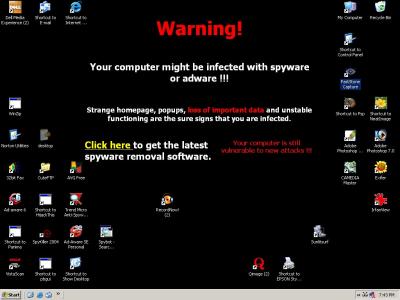
This is my desktop now

West Virginia

Okay, technically it's not a photo but a screen capture. But I need help!!

Saturday, I got attacked by the worst virus I've ever seen. It immediately disabled all my AV. Then my desktop changed before my eyes. It had this huge white box on the left with folder options and all my icons were pushed off the right.

Next, I discovered it had stripped my dial up connection of the phone number. I couldn't redo it because it would only allow me to connect by broadband.

I called my ISP. They told me to bring it in and they would fix it. Hah!

Monday I was in training. Every time I called no one could tell me what was going on. That was because the only time they were doing anything was when I showed up in person. They seemed to want an audience. Which I couldn't provide because I had to get back.

When I got out of training, I went there. They informed me they had run several AV programs and there was no virus. They thought I had been hacked and recommended reinstalling the OS as so many critical files were now missing.

I went home, put in the OS CD, keyed in my product code and restored it. I thought. No, I now had to activate Windows. I keyed in my product code again and was informed it was invalid and to call Windows.

So I did. They gave me a new set of numbers. Windows was activated.

This is what it looks like now. Lovely, isn't it?

I cannot change it. Clicking on Display only allows changes to the screensaver. No options for background.

Btw, when I got home and ran my AV programs I found two seperate viruses.

Any suggestions on how to circumvent the modified display option and get rid of this HUGE ad. Which is probably just another worm or virus or hijacker supplied free of charge by Microsoft.

And also, completely OT, I'm thinking of buying a Panasonic FZ5 for the zoom. Anyone used one?


other sizes: small medium large original auto
comment
Guest 26-Aug-2005 02:03
Karen, glad you have it working again. Since no one commented on the FZ5 camera, I have had a Pansonic FZ10 for a year and a half (basicly the same lens as the FZ5 but on an older camera) this is my first digital camera, I really like it and I love the zoom lens. I think you will be pleased with it. Check out the review onhttp://www.steves-digicams.com/2005_reviews/fz5.html There also several pansonic forums that you can check out too. ron
Karen Leaf25-Aug-2005 02:39
Oh ICK! I guess you've got the answers below. Good luck!
Cliff24-Aug-2005 20:12
Oh Yuck !
Reformating may be the only tried and true way. Good luck karen !
Roger McCallen24-Aug-2005 12:44
I would back-up all critical documents and images, then reformat and re-install your operating system. Make sure you have the most up to date version of Norton AV or Mcafee, either one does a fine job provided you ensure that your AV signatures are up to date. Also use a spyware program such as Spysweeper, this will prevent and spy/ad ware from messing things up in the future.

Sorry for yuour trouble but this is the only way to ensure you have cleaned the problem out. One more thing when you have backed up your documents onto disk make sure you scan them with your AV software bfore you put them back onto your PC.

Love your Galleries by the way - really great stories!
Roe..24-Aug-2005 10:52
Yikes..doesn't look good..computer get well soon..!
NealyBob24-Aug-2005 08:34
Real spooky
Argishti Khachik24-Aug-2005 06:49
well, first of all I am sorry for this unpleasant experience.
I had lots of worms, viruses and hijacks before I was using the Microsoft Explorer.
Since I switched to the Mozilla FireFox I've never got troubles with hijacks.

I've to admit that I've never seen this virus/hijack before.
Dear laine is right, It seams Jean has the answer. Just try to follow the steps.
If it doesn't work, then try the following AV tools:
avast! -> a freeware tool for home use:
http://www.avast.com/
(I am using it and it's wonderful. It can check your PC before the system boots up)

kaspersky:
http://www.kaspersky.com/ I think they have a trial version.

if non of this helps you, then the best solution is to backup your
important files, format the HDD and then reinstall the system.

just my two cents for future:
- Try Mozilla FireFox. Forget about the Internet Explorer.
- Install a small firewall like ZoneAlarm it's for free and works perfectly
http://www.zonelabs.com/store/content/catalog/products/sku_list_za.jsp?lid=dbtopnav_zass

- and a AV software which runs at background and checking every activity:
avast! does this.

well, now I can wish you all the best and success.
Cheers
Coleen Perilloux Landry23-Aug-2005 23:13
Good luck.
Stu23-Aug-2005 22:04
That must have given you a fright. I wonder where the perverse joy for the virus authors comes from!!
laine8223-Aug-2005 17:49
It looks like Jean has your answer Karen. I hope you can sort it.
Bryan Murahashi23-Aug-2005 15:22
This is an amazing and scary scene on your desktop. I've never seen this before, but
I would backup all your data and just start over with a disk format and reinstall of the
OS. I just hate to see this kind of destructive attack.
Herb 23-Aug-2005 13:53
That's a screwy one, no idea.
Gary Hebert23-Aug-2005 13:02
WOW, quite an experience Karen... sorry, can't help with the desktop and have never used a panasonic... :)
Breland23-Aug-2005 13:01
I can't help you here Karen, but I would suggest backing up all of your data if possible. Hope you can clean it up with no problems.