


|
|
|
|
|
|
|

| |
First, I made an overall color correction to my taste. I used the curves adjustment layer in Color blending mode and clicked on the white of eye with the neutral eyedropper. This seemed to adjust skin color close to "rule of thumb". If too extreme, the color adjustment layer opacity can be reduced.
Second: add a new layer in Soft Light blending mode, (filled with 50% gray, only needed for visualization.)
Paint a white crescent shape on the side of the iris opposite the catch light reflection, darken the perimeter of the iris and under the upper lid. I also darkened some of the eyelashes
Add red color to enhance brown eyes. Adjust layer opacity, if necessary, to soften the effect.
forum discussion: http://forums.dpreview.com/forums/read.asp?forum=1006&message=30981746&changemode=1
original image by Melissa: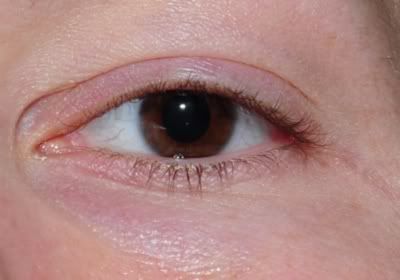
© Joseph E. Filer