


|
|
|
|
|
|
|
| |
| Christine Hudnall | |
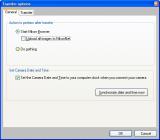
Under the GENERAL tab -
Once you make sure your computer and time are correct for YOUR location, click Synchronize date and time now. ( I do this once a month, just to double check everything. )
*This is also where I've set it to automatically start Nikon Browser*
Then, make sure that you click the box to Set the Camera Date and Time to your computer. Then click OK.
Copyright © Photo-Focus Yahoo Group Members
| comment | |