


|
|
|
|
|
|
|
| |
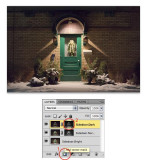
As before, click on the Mask icon (Item 1 in red above) at the bottom of the Layers palette to create
the brightness mask (Item 2 in red above) that appears beside the Layer Thumbnail which lets the
light areas of this darkest layer darken the bright areas of the two layers below it, but without
darkening the shadow areas.
And that's it. There is now detail in the areas that were blownout to featureless white in the bottom
layer and the house number below the light is now visible.
Once you have done this procedure a few times, you will find it very fast to do. It is my current HDR
method of choice and I use it often.
For a direct comparison between this final masked image and the original unmasked image with its
blownout highlights, click here.
Copyright © Gordon L Wolford - To purchase, click here.