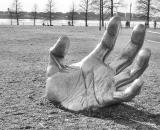
Mark Hemhauser posted an excellent image of a hand statue. He was trying to get better tones out of the image and I made some suggestions. Mark gave me permission to post the step-by-step process that I followed in making some changes.
Check out Mark's original image HERE.
Click next to view the other images in the process.
Process: For this step, the image layer was duplicated. Then it was inverted by using the shortcut, Control+I, and the layer blend mode was set to Overlay. Gaussian blur was applied by choosing Blur, Gaussian Blur, and setting the amount to 50.
These images are copyright 2003, 2004, 2005, 2006, 2007, 2008, 2009, 2010 and 2011 Linda Vich.