


|
|
|
|
|
|
|
| |
| 11-APR-2006 | CJ Burianek |
Last Year's Photo 
Photo a Day, 11 April 2006...
Best viewed in oringal
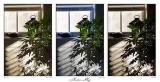
A shadow I noticed this morning and played around with it in Photoshop. I couldn't decide which I liked better...
Oringal shot (center) has only had some sharpening nothing else.
Selective Color (left) used color range (SELECT > COLOR RANGE) to select just the green leaves and then using channel mixer to create b/w (will automatically apply the color range as a mask if done in right after color range - invert (CTRL-I) to get the effect of changing the bg vice the leaves) then added a Hue/Sat layer clipped to the Channel mixer layer to give sepia tone (clipping to the channel mixer layer prevents changes to the greens - hold down ALT and click between the two layers in the Layers Palette).
Watercolor (right) applied a watercolor filter to the selective color image.
The title font is a new one from P22 called Allyson
ACR, Resize, Masked channel mixing (b/w), Hue/Sat (toning), Watercolor filter, Framing, Sharpening - Photoshop CS2 (read above)
All Images & CSS style © 2005-2009 Connie J Burianek. All rights reserved.
No use or direct linking w/o permission
| comment | |
| David Clunas | 16-Apr-2006 20:10 | |
| Mom | 12-Apr-2006 15:49 | |
| laine82 | 12-Apr-2006 01:37 | |
| Elaine (etfitz) | 12-Apr-2006 00:51 | |
| chrisse | 11-Apr-2006 19:46 | |
| Steve Price | 11-Apr-2006 17:21 | |
| Guest | 11-Apr-2006 16:41 | |
| purpod | 11-Apr-2006 15:11 | |