


|
|
|
|
|
|
|
| |
| 07-NOV-2005 | CJ Burianek |
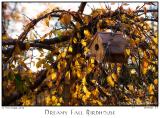
Photo a Day, Day 222...Spent a chunk of time this afternoon trying to catch a good shot of a leaf falling... got a few but none were terribly exciting... also took a shot of the birdhouse in the weeping cherry tree... then played with it in Photoshop...
What I did... I duplicated the background layer twice - one duplication I set to multiply and the other to overlay and then I did a gaussian blur on both of them and then played with the opacity... I then did a curve layer set to "Linear Dodge" and applied it selectively to the birdhouse... there are two curve layers above those. One set to "Luminosity" and mostly masked out other than the corners to create a bit of burning in on the corners and edge... and the other is set to "Screen" at a low opacity just to lighting things up a bit... Then a CTRL-ALT-SHIFT-E to merge all that to a new layer and run Smart Sharpen to sharpen things up a bit...
For those curious as to why... well I wasn't thrilled with the original shot.. it's ok... then I started playing with the Midnight Actions that I downloaded a while back... wasn't thrilled with them... so then I started reading through the actions to figure out what was going on in them and then modified to get something I thought looked good... sort of makes the leaves a bit softer and has a warmer glow... Curious as to whether others think it is a good, bad or indifferent change...
ACR, Resize, Frame... and all of the stuff above: PhotoshopCS2
All Images & CSS style © 2005-2009 Connie J Burianek. All rights reserved.
No use or direct linking w/o permission
| comment | |
| laine82 | 08-Nov-2005 13:15 | |
| Steven Jusczyk | 08-Nov-2005 08:41 | |
| Pepe Zyman | 08-Nov-2005 05:05 | |
| Bryan Murahashi | 08-Nov-2005 04:51 | |
| Guest | 08-Nov-2005 03:53 | |
| snootydog | 08-Nov-2005 02:55 | |
| Guest | 08-Nov-2005 02:02 | |
| Karen Leaf | 08-Nov-2005 01:44 | |
| Mindy McNaugher | 08-Nov-2005 01:34 | |
| don nieman | 08-Nov-2005 00:57 | |
