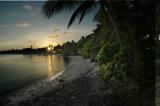
I have selectively erased the top layer to show the bottom layer through, the detail I want to show through that is. This was a trial and error excersize, dont expect to get it right the first time. I use backstep command, history list and fade command among others to backstep or adjust until I get it right (IMHO). I concentrated on the beach shack and worked (feathered) out from there. I had to leave the top branches dark and any adjacent to the sky so the sky itself would not be effected. I used a soft erasure at about 10% and just kept soft small erasure strokes as I went, so as not to overdoe it with any one stroke. I erased the shack area to about 100%, and faded out to the beach at about 50% and then out to nothing at the waters edge. Also a little erasing of the foreground and the bushes in front of the shack. I left the bushes and trees to the right as I wanted them to disappear, or not draw attention at least. I wanted the viewers eye to travel towards the light which would be alternatively the beach shack and the sunset.