


|
|
|
|
|
|
|
| |
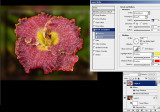
Select the flower and copy to a new layer.
Enlarge the flower layer slightly with the Transform tool to help obscure the flower in the underlying layer when it is blurred.
Add layer styles to layer 2: drop shadow and bevel/emboss with the default colors changed.
I also added a plastic wrap filter to layer 2 and faded the effect to about 60%.
The flower seems to take on the appearance of hot glass.
forum discussion: http://forums.dpreview.com/forums/read.asp?forum=1006&message=38857979&changemode=1
original image by Lucy:
© Joseph E. Filer