Jola, I decided to answer your questions here, and I've added a thumbnail link to a painting I did of Jude Law using Art History in a different style.
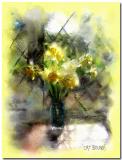
Art History is one of my favorite tools in PhotoShop. There are many different techniques for using it; sometimes I work in layers or onto a solid, filled layer above the original, but for these two examples, I worked directly onto the original photo.
If I'm trying for a watercolor effect, I usually add a border because traditional watercolors are done on paper, and the painted area sometimes has irregular edges. I often make a white border 1 or 2 inches wide, but for this one the yellow seemed to work. And of course, do your tweaking before you begin painting. This may involve cropping, sharpening, simplifying some areas, removing elements that are distracting, even changing colors.
The Art History Brush tool uses a history state or snapshot as its data source.
In the History Palette, click on the arrow in the upper right corner to get a drop down menu and click on "new snapshot". A snapshot will appear in the list with a brush icon beside it. (If at any time, you don't like how the painting is going, just click on the snapshot, and you're instantly back to the original.)
Select the Art History Brush tool.
In the upper left hand corner, you will see the Art History Brush icon; click on the drop down menu and choose a brush preset. There are a number of presets that come with PhotoShop, but once you become familiar with this tool, you can create your own presets and save them to this library. You can also download some excellent presets from Trimoon's website.
Spend some time playing with the various presets to learn what effects you can create. When I begin a painting, I start with a preset that's loose and set the size pretty large to make an underpainting. This takes a leap of faith as you watch your detailed photo change into color blobs. Don't just make random strokes, though; paint the image because the brush picks up individual colors and shapes from each area. Be patient and enjoy the process. I think one reason some people dislike Art History is because it's literally painting one stroke at a time, not like filters that work their magic with one click. AH is very Zen, just like holding a "real" paint brush.
Change your brush and gradually begin working smaller and in more detail but remember that it's often more "painterly" not to reveal too much detail. In the daffodil painting, I also decided I wanted some paint spatters and did this with PhotoShop brushes "dipped" in colors within the painting. Then I took it to Corel Painter to soften some areas, but if you don't have Painter, this can be done almost as easily in PhotoShop by returning to larger, softer brush presets.
I finished up by applying a pattern overlay from one of the PhotoShop Wow! books and then added a sandstone texture. I like the overlay because it adds a bit of a watery feel, but I used it sparingly, set to soft light at 21%.
I hope this makes sense. Ask questions if any of it is unclear.
cat