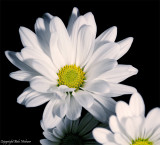
This image was made using the blend layers function in Photoshop.
Yesterday I had to use an aperture of F20 to get most of the flower in focus. Today I took all of them at F8 and set the focus point to the center, then a little higher and finally a few at the very back. I then used Adobe Bridge to load them all as layers into Photoshop where I applied Edit->Blend Layers->Stack. This method creates an image where much more is in focus than would normally be seen with F8. Notice especially how sharp the image is from the center of the flower to the back petals.
This method was a bit of a hit and miss exercise so unless you are making product shots that require an infinite depth of field, I would recommend just using a higher f-stop.